Passwords have been the foundation of online security for decades, but they are increasingly becoming a weak point in modern digital systems. In this guide, we break down passkeys explained in 2026, exploring how they work, why they are replacing traditional passwords, and what this shift means for everyday users. As cybersecurity threats continue to evolve, passkeys are emerging as a more secure and user-friendly alternative for protecting online accounts.

At FlixTechs, we’re seeing a massive shift: Passkeys have officially crossed into the mainstream. Here is everything you need to know about why they matter and how to set them up.
What Are Passkeys?
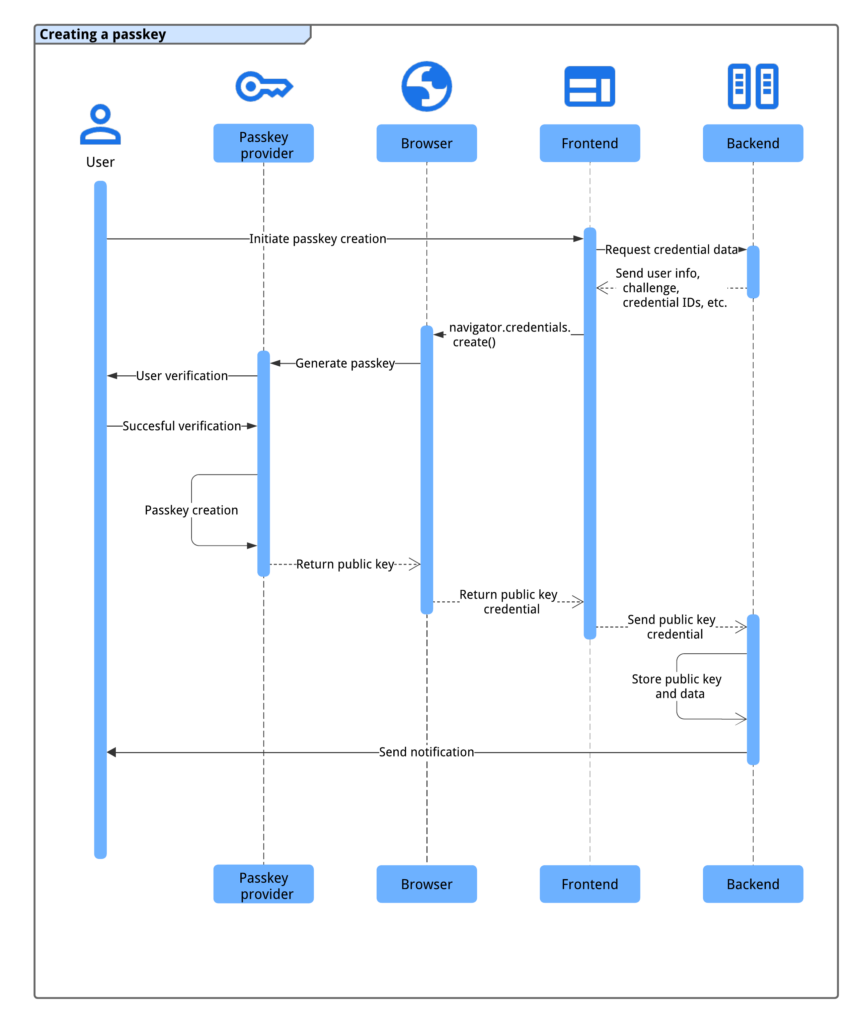
Passkeys are a modern authentication method designed to replace passwords. Instead of relying on something you remember, like a password, passkeys use cryptographic keys stored securely on your device.
A passkey system works using:
- a public key stored on the server
- a private key stored on your device
The Magic: When you log in, your device uses the private key to “sign” a challenge from the website. You verify it’s you using FaceID, TouchID, or your device PIN. No data is ever sent over the internet that a hacker could intercept.
Why Passwords Are No Longer Enough
Traditional passwords have several weaknesses:

1. Easy to Guess or Reuse
Many users reuse passwords across multiple platforms, making accounts vulnerable if one site is compromised.
2. Phishing Attacks
Hackers can trick users into revealing passwords through fake websites or emails.
3. Data Breaches
Large-scale breaches expose millions of passwords, putting users at risk.
4. Poor User Experience
Remembering complex passwords is difficult, leading to weak or repeated credentials.
How Passkeys Work
Passkeys use a system called public-key cryptography.
Here’s how it works:
- You create an account on a website
- Your device generates a pair of keys
- The public key is stored on the server
- The private key remains securely on your device
When logging in:
- the server sends a challenge
- your device signs it using the private key
- access is granted without revealing sensitive information
Why Passkeys Are More Secure
Passkeys eliminate many of the risks associated with passwords.
1. No Shared Secrets
Passwords are shared between user and server. Passkeys are not.
2. Phishing Resistance
Passkeys only work on legitimate websites, making phishing attacks ineffective.
3. Device-Based Security

Authentication is tied to your device, adding an extra layer of protection.
4. Encrypted Storage
Private keys are stored securely, often protected by biometrics or device security.
Benefits of Using Passkeys
1. Improved Security
Passkeys significantly reduce the risk of unauthorized access.
2. Simpler Login Experience
Users no longer need to remember passwords.
3. Faster Authentication
Logging in becomes quicker with biometrics or device authentication.
4. Reduced Risk of Data Breaches
Even if a server is compromised, passkeys cannot be easily exploited.
Where Passkeys Are Used Today
In 2026, passkeys are widely supported across major platforms:
- mobile devices
- web browsers
- operating systems
Many companies are adopting passkeys to improve both security and user experience.
Passkeys vs Passwords
| Feature | Passwords | Passkeys |
|---|---|---|
| Security | Moderate | High |
| Phishing Risk | High | Very Low |
| User Experience | Difficult | Easy |
| Data Exposure | Possible | Minimal |

Are Passkeys the Future?
All signs point to yes.
Technology companies are moving toward passwordless authentication because:
- it improves security
- it reduces user friction
- it aligns with modern cybersecurity needs
Passkeys represent a shift toward a safer and more efficient internet.
Common Misconceptions About Passkeys
1. Passkeys Can Be Stolen Easily
In reality, private keys never leave your device.
2. They Replace All Security Measures
Passkeys are part of a broader security system, not a standalone solution.
3. They Are Difficult to Use
Passkeys are designed to simplify authentication, not complicate it.
How to Set Up Passkeys on Your Devices
Transitioning is easier than you think. Here is the 2026 roadmap for your main ecosystems:
On Android & Chrome
- 1. Go to your Google Account Settings > Security.
- 2. Select Passkeys and Security Keys.
- 3. Tap Create a Passkey. Your phone will now be your primary “key” for all Google services.
On iPhone, iPad, and Mac
- 1. Ensure iCloud Keychain is enabled in your iCloud settings.
- 2. Navigate to a supported site (like Amazon or eBay) and go to your Account Security.
- 3. Choose “Set up Passkey” or “Sign in with Device.” Your Apple devices will sync this key automatically.
For Windows Users
- 1. Use Windows Hello. Go to Settings > Accounts > Sign-in options.
- 2. Set up Fingerprint or Facial Recognition.
- 3. When a website asks to create a passkey, Windows will securely store it in your PC’s TPM (Trusted Platform Module).
Challenges of Passkeys
While passkeys offer many benefits, they also come with challenges:
- reliance on devices
- compatibility across platforms
- user awareness and adoption
However, these challenges are being addressed as technology evolves.
The Role of Biometrics in Passkeys

Passkeys often use biometrics such as:
- fingerprint recognition
- facial recognition
This adds an extra layer of security and convenience, making authentication seamless.
How Passkeys Improve Online Security
Passkeys reduce reliance on weak passwords and introduce stronger authentication methods.
They help:
- prevent unauthorized access
- reduce phishing risks
- improve user confidence
The Future of Authentication
The shift toward passkeys is part of a larger trend in cybersecurity.
Future systems may include:
- advanced biometrics
- behavioral authentication
- AI-driven security
Passkeys are just the beginning of this transformation.
The FlixTechs Verdict
Passwords have long been the standard for online security, but they are no longer sufficient in today’s digital environment. Passkeys offer a more secure, efficient, and user-friendly alternative.
Understanding passkeys explained in 2026 helps users stay informed about the future of login security and how modern authentication systems are evolving. As adoption grows, passkeys are set to become the new standard for protecting online accounts.
FAQs
What are passkeys?
Passkeys are a passwordless authentication method that uses cryptographic keys to verify identity.
What if I lose my phone?
Most users sync passkeys via Google Password Manager, iCloud Keychain, or 1Password. If you get a new phone, signing into your cloud account restores all your passkeys instantly.
Can companies track my biometrics?
No. Your fingerprint or face scan is processed locally on your device’s chip. The website only receives a “Yes/No” cryptographic signature.
Do I need a separate passkey for every site?
Yes, but your device handles it automatically. You don’t “manage” them; you just tap your sensor and go.
Are passkeys more secure than passwords?
Yes, passkeys are more secure because they eliminate many common vulnerabilities associated with passwords.
Do passkeys replace passwords completely?
Passkeys are designed to replace passwords, but adoption is still ongoing.
Can passkeys be hacked?
They are much harder to compromise because private keys remain on the user’s device.
Are passkeys widely used in 2026?
Yes, many platforms are adopting passkeys as part of modern security systems.